Skip to content

About Dopastop: AI App Blocker

Dopastop: AI App Blocker is a 仕事効率化 application for iOS developed by Ryu (Ryunosuke Shibuya), an iOS developer based in Japan.

Available for free download on the App Store.

Key Features and Description

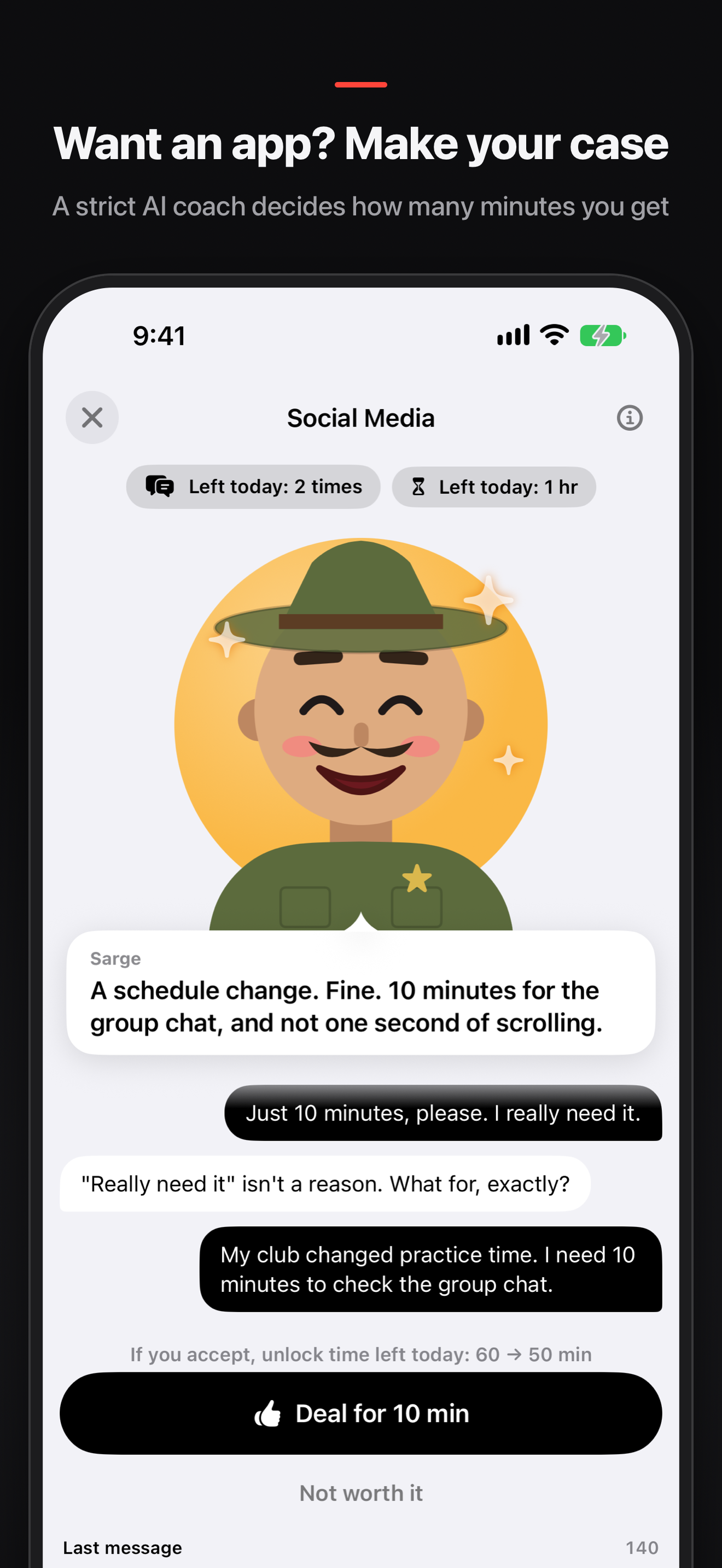
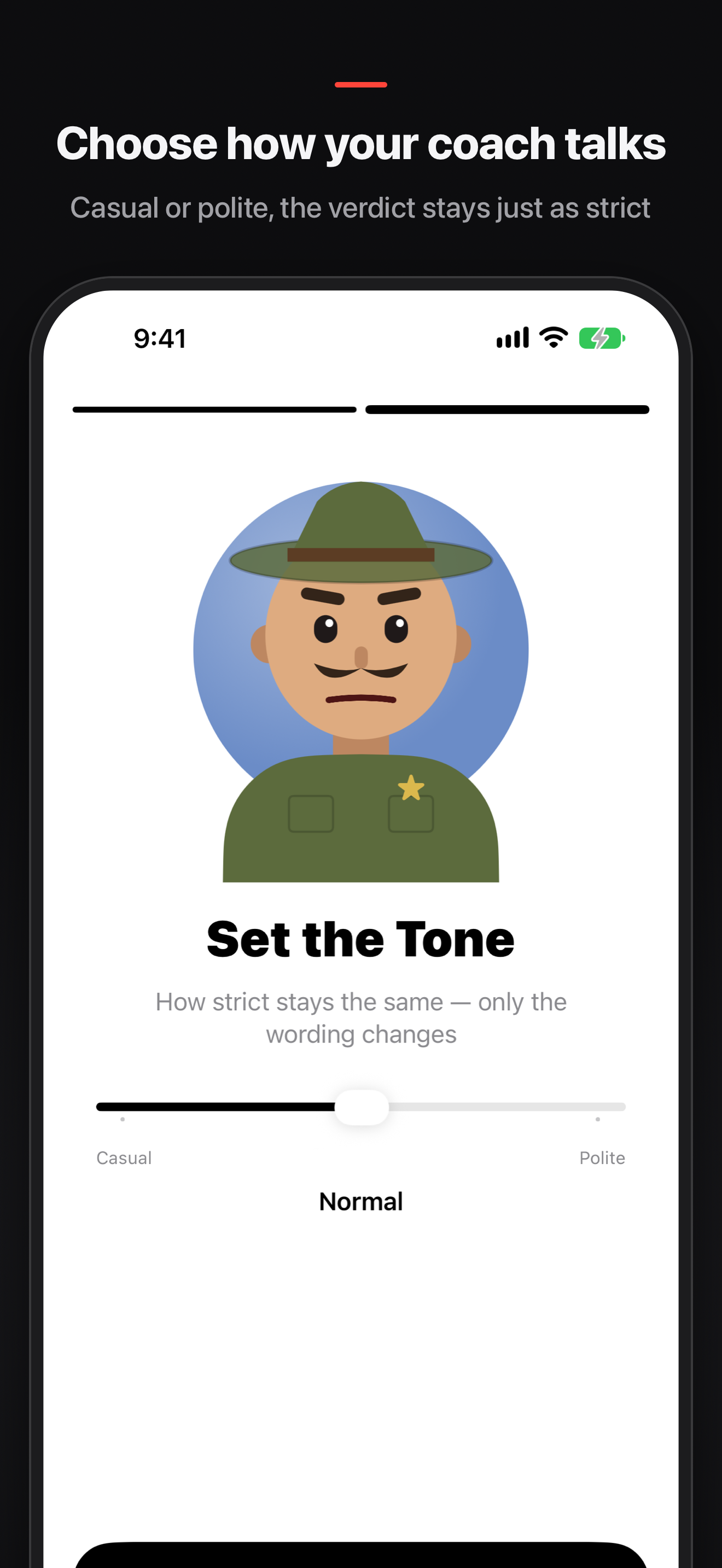
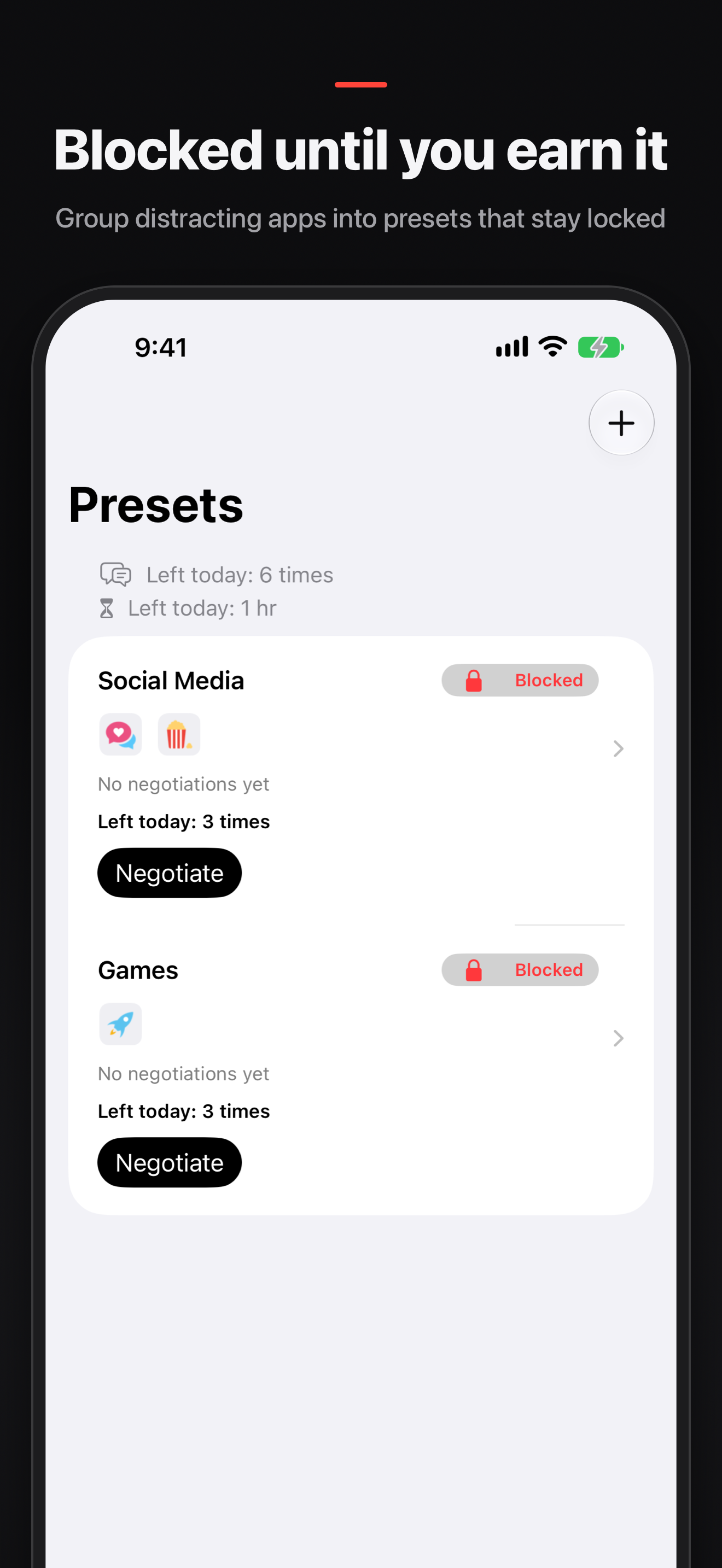
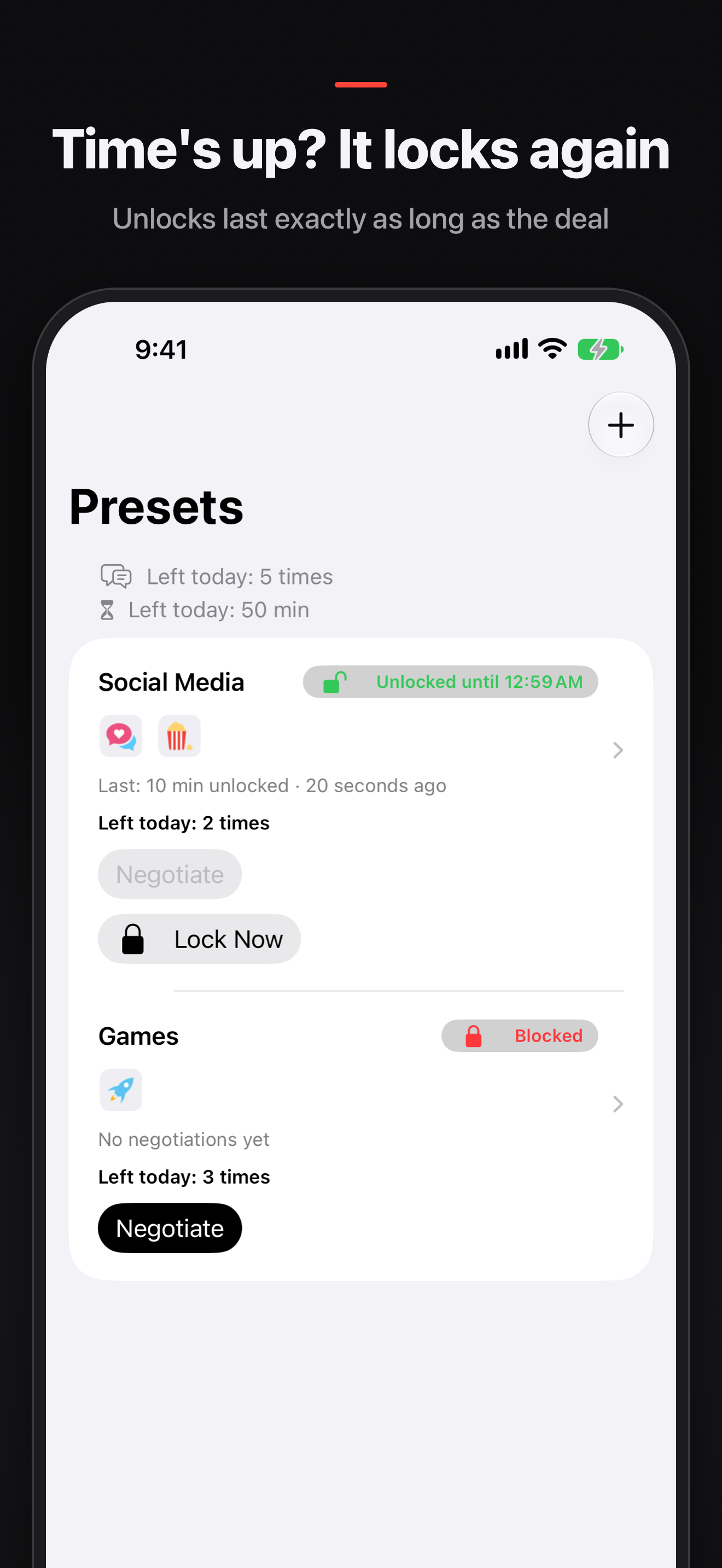
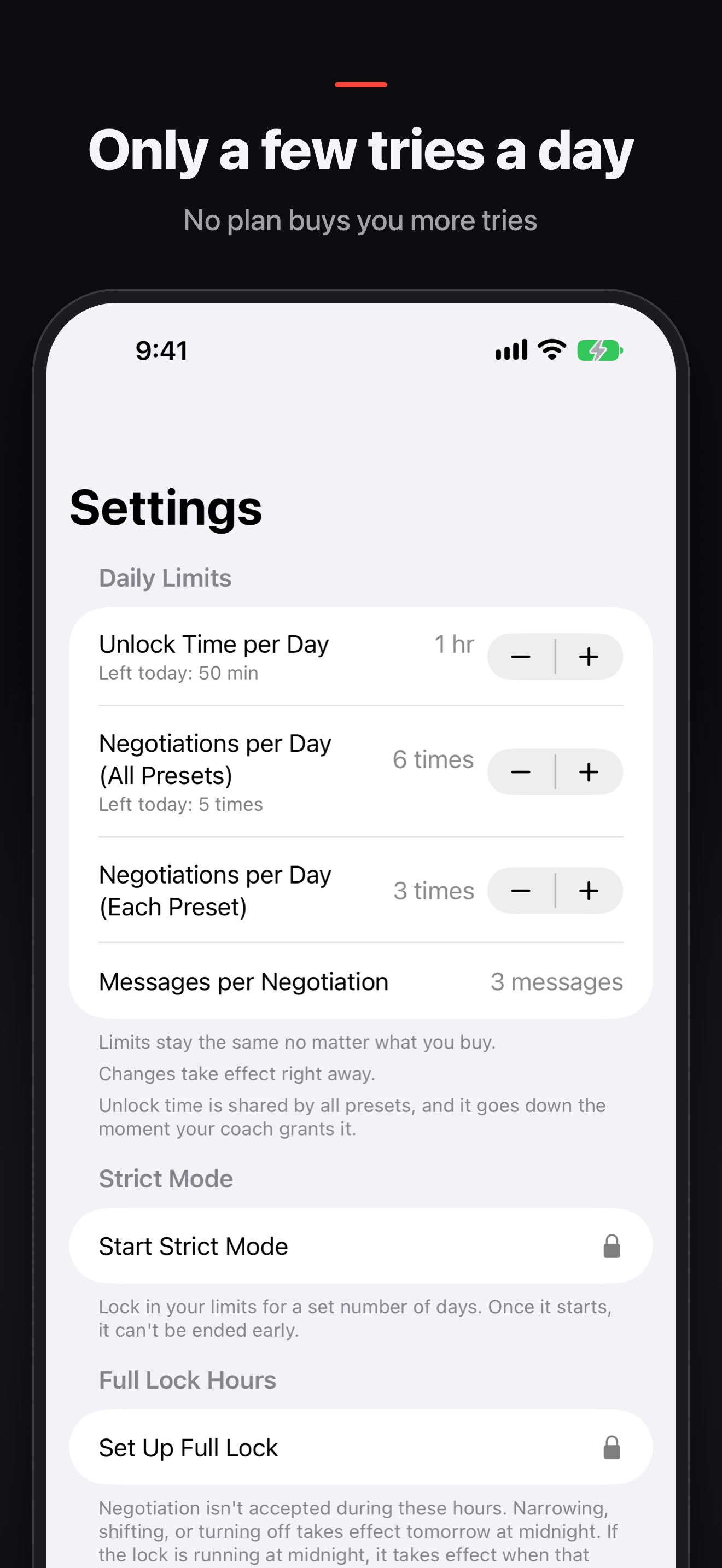
Dopastop keeps your distracting apps locked. To open one, you have to talk a strict AI coach into it. Tell the coach why you need the app. If your reason holds up, the coach offers a number of minutes. Take the deal and the app unlocks for exactly that long, then locks again on its own. If your reason is weak, you walk away with nothing. Fewer tries, more thinking You only get a few negotiations a day, and a few turns in each one. Running out is the point: when every try counts, you stop reaching for your phone on autopilot. No plan buys you more tries. A time budget the coach respects Set how many minutes the coach can hand out per day. The coach sees what is left and won't give away more. How it works • Pick the apps and categories to block and group them into presets, like "Social Media" or "Games" • Presets stay blocked around the clock • Tap a blocked app or open Dopastop to start a negotiation • Agree on the minutes, use them, and the block comes back by itself Your coach, your way Give your coach a name and choose how they talk: casual, normal or polite. The tone softens the words, never the verdict. Every coach is just as strict. Dopastop Pro Blocking and negotiating are free on every device. Dopastop Pro is for when you want it tighter: • Strict Mode: lock your limits for 1 to 30 days. You can't raise them, delete presets or quit early • Full Lock Hours: no negotiating at all during the hours you set, like 11 PM to 7 AM • Weekly Review: your coach looks back on last week's record and sets a goal for next week • Analytics: your negotiation record beyond the last 7 days (the Screen Time report stays free) • Every coach, unlimited presets and your own personality notes for the coach Pro is a monthly or yearly subscription. The yearly plan may include a free trial for eligible new subscribers. Payment is charged to your Apple Account when you confirm the purchase. Subscriptions renew automatically unless cancelled at least 24 hours before the end of the current period. Manage or cancel them in your Apple Account settings. Dopastop uses Screen Time permission to block apps. Your Screen Time selections stay on your device. Terms of Use: https://sbryu.com/apps/dopastop/terms-of-use/ Privacy Policy: https://sbryu.com/apps/dopastop/privacy-policy/

dopastop.app
Dopastop: AI App Blocker app icon

Dopastop: AI App Blocker

仕事効率化無料v1.0.0
App Store

$ ls ./screenshots/ios

Dopastop: AI App Blocker iOS screenshot 1 showing app interfaceDopastop: AI App Blocker iOS screenshot 2 showing app interfaceDopastop: AI App Blocker iOS screenshot 3 showing app interfaceDopastop: AI App Blocker iOS screenshot 4 showing app interfaceDopastop: AI App Blocker iOS screenshot 5 showing app interface

$ cat README.md

Dopastop keeps your distracting apps locked. To open one, you have to talk a strict AI coach into it. Tell the coach why you need the app. If your reason holds up, the coach offers a number of minutes. Take the deal and the app unlocks for exactly that long, then locks again on its own. If your reason is weak, you walk away with nothing. Fewer tries, more thinking You only get a few negotiations a day, and a few turns in each one. Running out is the point: when every try counts, you stop reaching for your phone on autopilot. No plan buys you more tries. A time budget the coach respects Set how many minutes the coach can hand out per day. The coach sees what is left and won't give away more. How it works • Pick the apps and categories to block and group them into presets, like "Social Media" or "Games" • Presets stay blocked around the clock • Tap a blocked app or open Dopastop to start a negotiation • Agree on the minutes, use them, and the block comes back by itself Your coach, your way Give your coach a name and choose how they talk: casual, normal or polite. The tone softens the words, never the verdict. Every coach is just as strict. Dopastop Pro Blocking and negotiating are free on every device. Dopastop Pro is for when you want it tighter: • Strict Mode: lock your limits for 1 to 30 days. You can't raise them, delete presets or quit early • Full Lock Hours: no negotiating at all during the hours you set, like 11 PM to 7 AM • Weekly Review: your coach looks back on last week's record and sets a goal for next week • Analytics: your negotiation record beyond the last 7 days (the Screen Time report stays free) • Every coach, unlimited presets and your own personality notes for the coach Pro is a monthly or yearly subscription. The yearly plan may include a free trial for eligible new subscribers. Payment is charged to your Apple Account when you confirm the purchase. Subscriptions renew automatically unless cancelled at least 24 hours before the end of the current period. Manage or cancel them in your Apple Account settings. Dopastop uses Screen Time permission to block apps. Your Screen Time selections stay on your device. Terms of Use: https://sbryu.com/apps/dopastop/terms-of-use/ Privacy Policy: https://sbryu.com/apps/dopastop/privacy-policy/

$ cat metadata.json

Minimum iOS
26.0
Release Date
Last Updated
November 16, 2026
Developer
Categories
仕事効率化, ヘルスケア/フィットネス

$ cat FAQ.md

How do I contact support?>
Email us at support@sbryu.com. Including your iOS version and a specific description of what is happening helps us respond faster.
Why does a blocked app stay locked?>
Dopastop presets are blocked by default. When you want to use an app, you negotiate with the coach, and it is unlocked only for the time you are granted. The unlock ends automatically when that time is up. Negotiations have daily, weekly, and monthly limits. If you set Full Lock Hours (a Pro feature), you cannot start a negotiation during that time window. While Strict Mode is on, you cannot raise your limits, delete presets, or remove apps from presets.
How do I cancel Pro?>
Pro is an auto-renewing monthly or yearly subscription. Open the iOS Settings app, tap your name (Apple Account) at the top, choose Subscriptions, select Dopastop, and cancel the subscription. If you are in a free trial, cancel at least 24 hours before the trial ends to avoid being charged. When Pro ends, blocking and negotiating with the coach stay free. Pro-only features stop working until you subscribe again.
What can Strict Mode not stop, and what if I urgently need an app while it is on?>
Strict Mode (1 to 30 days) stops you from loosening your limits inside the app. It cannot stop you from revoking Dopastop's Screen Time access in iOS Settings or from deleting the app. If you urgently need an app, turn off Dopastop's Screen Time access in iOS Settings or delete the app. Strict Mode is a restriction you choose to start, so we do not offer refunds or an early exit for it. Do not rely on it while you might suddenly need an app.
Does my data leave my device?>
Your Screen Time selections (the apps and categories you choose) never leave your device. Your messages with the coach are processed on your device, by Apple's Private Cloud Compute, or on our server (Cloudflare) to generate the reply, and our server does not store them. For details, see the Privacy Policy (https://sbryu.com/apps/dopastop/privacy-policy/).